Here's the short version: if you just want to play Meteon Run for free, all you need is to download the app and create an account. If you want to go further and earn tokens with an NFT sneaker equipped, you'll also need three extra things: a wallet (an app that holds your crypto), a crypto exchange account, and an NFT sneaker.
This guide splits the process into two stages — "start for free" and "get ready to earn" — and walks through each step in order, flagging the spots where beginners most often get stuck. Our recommendation: play for free first, and only move on to the earning setup once you know you enjoy the game. It's the sequence with the fewest ways to go wrong.
Start Meteon Run for Free in 3 Steps
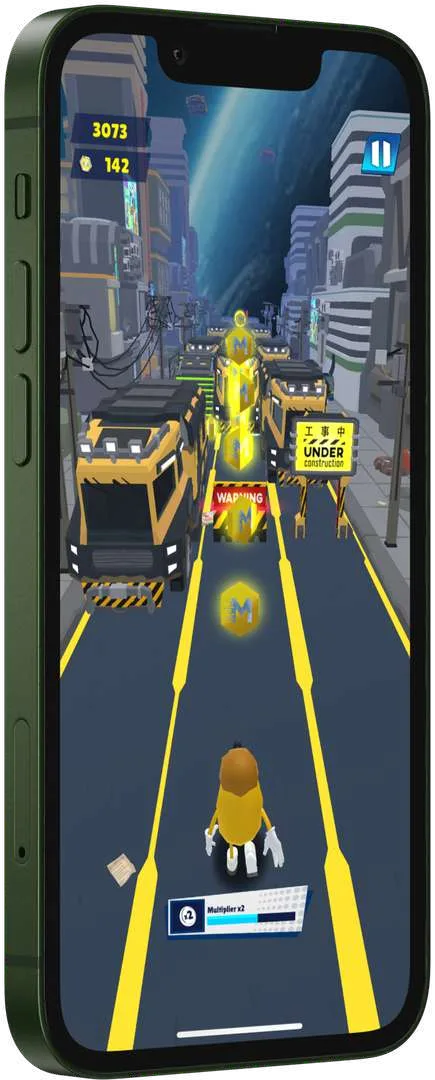
Meteon Run is a mobile game for iOS and Android, listed as free with in-app purchases on the App Store, and you can enjoy the game itself without owning any NFTs. Follow these three steps and you'll be running through space today.
Download the App for Free
Grab "Meteon Run" from the App Store or Google Play — the download is free. If you're searching the stores, look for "Meteon Run" (it may be listed as "Meteon Run - Space Runner"). Our invite link below opens the right store for your phone.
Opens the App Store on iPhone and Google Play on Android. Registering through our invitation link (Meteon Run's official invite feature) gives both the inviter and the new player an in-game gift (official whitepaper). It costs you nothing. Direct links: App Store / Google Play
Create an Account
Launch the app and follow the on-screen prompts to create your account. You don't need a wallet or an NFT at this point. Your login details will later be tied to your sneakers and tokens, so keep them somewhere safe.
Learn the Ropes in Free Play
The controls are simple: just tap and swipe. You sprint through courses in outer space, dodging obstacles and collecting coins. Follow the in-app guidance and play free mode until the courses start to feel natural (see the official guide for details of current game modes).
Getting Ready to Earn — Wallet, Exchange, and NFT Sneaker
If you plan to earn GMTO — Meteon Run's in-game token — and eventually cash it out, you'll want to set up these three things. Everything can be done from your phone, but exchange account verification can take time, so it's worth starting this in parallel with your free play.
1. Set Up a Wallet (Garage Wallet or MetaMask)
A wallet is a "digital purse" that lets you store, send, and receive crypto assets and NFTs yourself. Meteon Run runs on the Polygon blockchain. The easiest route is to log in to Meteon Garage (market.meteornrun.io), the official marketplace, with the same account you use in the app — a Polygon wallet (the Garage Wallet) is generated for you automatically, with no seed phrase to manage (per the whitepaper; you recover it through your social login). You can also connect an external wallet such as MetaMask if you prefer. The Meteon Garage guide walks through the screens.
- Log in to Meteon Garage with the same account as the app and find your auto-generated wallet address on the Wallets page
- If you use an external wallet, install the genuine app from the official app store (watch out for fakes), write down your seed phrase (recovery phrase), and add and select Polygon as the network
- Your Garage Wallet is tied to your login account, so turn on two-factor authentication for your Google/Apple account
8F2442D3 — enter it if asked (the link is Meteon Run's official invite feature; it costs you nothing, and both sides receive an in-game gift — see About Our Links). The Hub also states that you can't receive rewards unless Garage registration and wallet linking are done before you play, so finish both before you start running with an NFT sneaker.
2. Set Up a Crypto Exchange Account
Meteon Run's tokens MTO and GMTO have been listed on overseas crypto exchanges (MTO on XT.com, GMTO on LBANK) — check the exchanges and the official website for current availability. Since you typically can't buy them directly with your local currency, the usual flow has two stages:
- Open an account on a crypto exchange available in your region, deposit funds, and buy a major cryptocurrency
- Transfer that crypto to an exchange that lists GMTO/MTO, or to your own wallet, and swap it as needed
Opening an exchange account usually requires identity verification (submitting ID documents), and approval can take some time. Also keep in mind that crypto regulation differs from country to country — check which exchanges are available where you live, and understand that using any exchange is at your own risk.
3. Get an NFT Sneaker on the Marketplace
The final piece of the setup is the heart of Meteon Run: an NFT sneaker. Sneakers are sold on Meteon Garage, the official marketplace (pay in USDT, MTO, GMTO, or POL; gas is paid in POL), with a lineup that runs from affordable trial sneakers to high-rarity collectibles. A purchased NFT appears under "My NFT" on Garage, and you send it into the game to equip it (see the Meteon Garage guide for the purchase steps). A sneaker's rank (rarity) sets its repair cost (priced in USD) and how much it earns — there are no stat values to compare (see the sneaker catalog & strategy guide for each rank) — but for your first pair, an affordable trial sneaker is the way to go. Start small, get a feel for wear-and-repair costs and your earning pace, and step up later if it makes sense.
To use a purchased NFT, open "MY NFT" on Garage, tap the "In Game" button to sync it into the game, then pick "Wear shoes" under "MY BOX" in the app (the sneaker guide walks through the steps). Once it's equipped, every run will start earning you GMTO — rewards from runs played without an NFT equipped can't be claimed later (Meteon Run Hub). For a deeper look at how it all works, see the "Run to Earn" overview on the homepage and the earning guide.
A Suggested Plan for Your First Week
Not sure where to begin? Here's a model schedule for week one. There's no rush to buy an NFT — run the setup and the gameplay in parallel, at a pace that feels comfortable.
Days 1–2: Learn the Controls in Free Mode
Download the app, create your account, and use free play to learn the courses and obstacle patterns. This is also your chance to decide whether the game is a good fit for you.
Days 3–4: Set Up Your Wallet and Exchange Account
Log in to Meteon Garage to set up your wallet (an external wallet such as MetaMask is optional) and turn on two-factor authentication for your login account. At the same time, apply for your crypto exchange account (you can keep playing while verification is pending). This is also a good moment to start following the official X account (@meteorn_run) and the official Medium for news.
Days 5–7: Try Earning Small with a Trial Sneaker
Pick up an affordable trial sneaker on the marketplace, equip it, and play every day. Track how much GMTO you earn against your sneaker's wear and repair costs to build your own sense of the economics. Consistent daily runs are the foundation.
Common Pitfalls and How to Avoid Them
Pitfall 1: "I'm afraid of picking the wrong network when transferring"
When sending crypto, the network (chain) you send on matters just as much as the destination address. Send on an unsupported network and you risk losing your funds. The fix: always confirm which networks the receiving side supports before sending, and on your first transfer, send a small test amount and confirm it arrives before sending the rest.
Pitfall 2: "I'm worried about managing my seed phrase" / "I lost it"
Lose your seed phrase and you won't be able to restore your wallet if your phone breaks or you switch devices. If it leaks, your funds can be drained. The fix: write it on paper as soon as you create the wallet, keep copies offline in more than one place, and check periodically that they're still legible. If you realize it's lost, consider moving your assets to a fresh wallet. And remember: anyone asking for your seed phrase in a DM is running a scam.
Pitfall 3: "My wallet won't connect" / "My NFT isn't showing up"
Sometimes a purchased NFT sneaker doesn't appear in the game, or the wallet connection throws an error. The fix: update both the app and your wallet to the latest versions, restart them, and confirm the wallet is connected to the Polygon network. If that doesn't solve it, check the official website and the official X account for known-issue announcements. Always connect your wallet through official links in the official site or app — never through search ads or unofficial links.